Basecamp
The self-learning AI harness, on your desktop
All the power of the major AI models at a fraction of the cost - or free. Chat, generate images and video in the integrated studio, and watch it build skills from experience. Built for power users, friendly for beginners. No subscription, no markup - your keys, your data.
Get the beta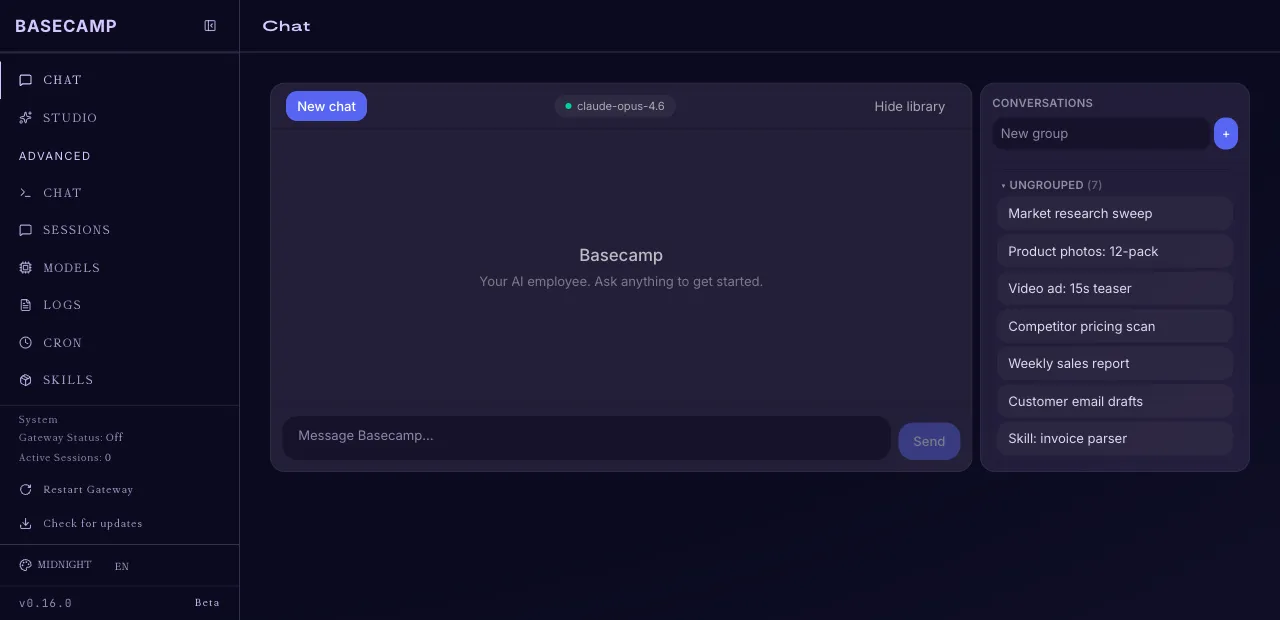
Why Basecamp
It learns as you use it
Basecamp has a built-in learning loop: it creates skills from experience, improves them during use, and remembers what matters to you across sessions. It gets sharper every day.
Every model, one app
Talk to the most powerful frontier models through OpenRouter, or run local models on your own machine for free. Swap whenever you like - you are never locked into one provider.
Plugins and skills, built in
Kanban, achievements, and a growing library of skills sit right on the dashboard. The harness comes loaded - you just start using it.
No subscription, no markup
Bring your own keys and pay providers directly, at cost, only for what you use - typically a fraction of stacking AI subscriptions.
Integrated AI video and content studio
Type a prompt and get images and short video clips, right next to your chat. One app for your content - no design tools needed.
Yours, not theirs
Keys live in your OS keychain, conversations live on your machine. Nothing routes through our servers.
Up and running in minutes
- 1
Download and open
Grab the beta for macOS or Windows and open it like any other app.
- 2
Paste two keys
Basecamp asks for an OpenRouter key and a MUAPI key on first launch. We show you exactly where to get them.
- 3
Try all three
Have a chat, generate an image, generate a video. Then watch it start learning how you work.
Get the beta
Drop your email and we'll send you the download link as soon as it's ready.
You're on the list. Watch your inbox.
This is a beta - on purpose
When your download arrives, try all three: the chat, the image generation, the video generation. Tell us what's rough, what's missing, and what you wish it did - we adapt and update the app to your feedback.
Don't get locked in. Let's master this together.
Questions, answered
- What does 'self-learning' actually mean?
- Basecamp has a built-in learning loop: it creates skills from experience, improves them while you use it, and builds a deepening picture of how you work across sessions.
- Am I locked into one AI provider?
- No. Your OpenRouter key gives you every major frontier model through one account, and you can point Basecamp at local models running on your own machine for free. Swap models whenever you like.
- What does it cost?
- The beta is free, with no subscription and no markup. You bring your own OpenRouter and MUAPI keys and pay those providers directly, at cost, for what you use - typically a fraction of stacking multiple AI subscriptions.
- Do I need to be technical?
- No. Setup is paste two keys and go - we show you exactly where to get them. Power users get a full harness with sessions, cron, skills, and local models; beginners can just chat and create.
- Where do my keys live?
- In your operating system keychain (macOS Keychain or Windows Credential Manager). Never on our servers, never in plain text on disk.
- What platforms are supported?
- macOS (Apple Silicon and Intel) and Windows 10/11.
- Why does macOS or Windows warn me when I install?
- Beta builds are not yet code-signed. Your download email will include simple one-time steps to get past the warning on macOS and Windows.